Remdraw is a whiteboard where any frame you draw can become a flashcard. You sketch on an Excalidraw canvas. You star a frame. From then on, Remdraw schedules that frame for review with a spaced repetition algorithm, as Anki does with a card. My one-line pitch was Remdraw = Excalidraw + Anki.
I built it in 2024, from May to September, as the project for my dissertation. This post records the product thinking behind it. It has three parts: why I built it, how I built it, and what it achieved.
The Remdraw demo on YouTube
Why I Built It
Two old ideas sit behind Remdraw.
The first is that repetition is the mother of learning. In 1885, Hermann Ebbinghaus described the forgetting curve: memory drops fast unless you reinforce it. He also described the spacing effect: reviews spread out over time work better than reviews crammed together. A spaced repetition system (SRS) automates this. It tells you what to review today, and nothing else.
The second is that a picture is worth a thousand words. Concept maps, mind maps and online whiteboards such as Miro and Excalidraw let you show how ideas connect. The Feynman technique works the same way: draw the concept, then explain it to yourself in your own words.
Each kind of tool does half of the job.
Flashcard apps are text editors. Anki, Quizlet and SuperMemo are good at scheduling. But you make the card in a text box. A text box is not flexible enough to express a complex concept the way a diagram can. To put a diagram on a card, you draw it in another tool and paste it in as an image. Making cards this way is tedious and slow.
Whiteboards forget. Miro and Excalidraw are good for thinking. But a board never asks you to look at it again. What you drew fades from memory, even though it stays on the board.
Note tools sit in between. I compared eleven tools for my dissertation. Obsidian, Notion, Roam Research and Heptabase have notes, links and tags, and some have whiteboards. None of them has spaced repetition built in. RemNote has spaced repetition, but no whiteboard.
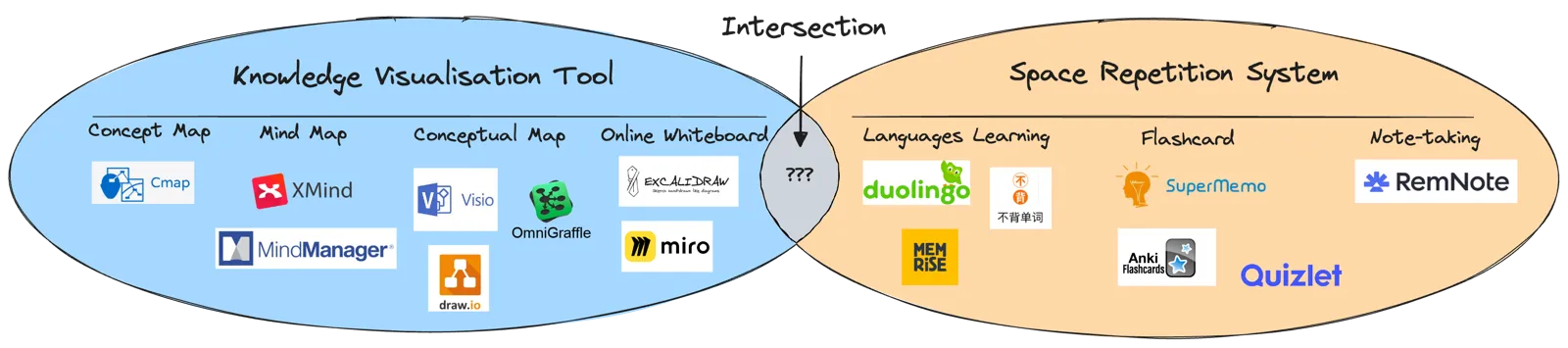
The idea behind the project, from my dissertation: nothing sat at the intersection
So Remdraw is for a learner who already thinks by drawing: a lifelong learner who sketches to understand. That person should not have to choose between understanding a topic and remembering it.
How I Built It: Product Decisions
I split the requirements into two halves: a whiteboard built on scenes and spaced repetition built on frames. A scene is one board. A frame is a box on the board that groups elements. Excalidraw already has frames. Most of my product decisions came from one question: how little do I need to add to a whiteboard to make it a flashcard app?
Decision 1: The card is a frame you already drew
There is no card editor in Remdraw. You draw on the board as usual. When a frame is worth remembering, you click the star on its preview in the sidebar. That frame joins your review deck.
The card does not copy the drawing. It points to the frame. When a review starts, the server reads the scene and pulls out only the elements inside that frame. So when you fix a mistake on the board, the card is fixed too. There is one source of truth, and it is the board.
The sidebar sorts frames by their position: top to bottom, then by x. That is the reading order of the board. It is not the order in which you drew the frames.
Deleting a frame does not destroy its history. On every save, the client compares the new board with the last saved one and finds the frames that were created and deleted. A deleted frame is only marked as deleted. If you press undo and the frame comes back, it is marked as active again, with its whole review history.
Decision 2: Front and back are tags on elements
A flashcard needs a question and an answer. A text app gives you two fields. I did not want two canvases. Instead, you select any element and set its display to All, Front or Back. A preview switch lets you check each side while you edit.
In review, Remdraw shows the front first. Every element tagged Back is hidden. When you click Show Answer, the front is hidden and the back appears. An element with no tag shows on both sides, so a title or a shared diagram needs no work.
Tags are optional. A frame without tags is simply a note to look at again. You see the whole frame, then you rate it. I wanted the cheap path to be the default.
Decision 3: Review on the same canvas
Review does not use a separate card viewer. It opens the frame in the same Excalidraw canvas, in view mode and zen mode, so all editing tools are hidden. Images, colours and hand-drawn shapes look exactly as they did on the board. A button puts the review in full screen.
The flow has four steps:
- The Review page shows how many frames are due today.
- You see the front, and click Show Answer.
- You see the back, and rate yourself: Again, Hard, Good or Easy. Each button shows when you will see the frame next.
- When nothing is left, confetti and “No more frames to review”.
The interval under each button matters. It tells you the cost of each rating before you click. While you look at one frame, the app already fetches the next one, so the next frame appears at once.
Decision 4: Use FSRS, not my own algorithm
I did not invent a scheduler. Remdraw uses FSRS from the Open Spaced Repetition project, through its Go library, with default parameters. FSRS keeps a small state for each card: stability, difficulty, number of reviews, number of lapses, and the next due date.
To show what the defaults do, I ran the same library version on a new card. I rated it Good each time, on the day it was due:
| Review | Next interval after Good |
|---|---|
| 1st (new card) | 10 minutes |
| 2nd | 4 days |
| 3rd | 15 days |
| 4th | 48 days |
| 5th | 139 days |
| 6th | 368 days |
Six reviews push a frame out to about a year. That is the promise of spaced repetition: little work, each review further apart.
How I Built It: Architecture
The dissertation weighed a cloud architecture against local-first software. I chose the cloud. A learning tool must work on every device, and a server made that simple for a project of one person. I picked boring, proven parts.
- Frontend: React, TypeScript, Tailwind CSS and shadcn/ui, built with Vite. The whiteboard is the Excalidraw React component. I compared it with tldraw and chose Excalidraw because it looks good and is easy to use.
- Backend: Go with the Gin framework. It is a plain REST API under
/api/v1, with JWT authentication. - Database: PostgreSQL. It covered most of my needs alone.
- Files: Cloudflare R2 for images.
Storage: one board, one row
Each scene is one row in PostgreSQL. The Excalidraw elements are stored as one JSONB array. I did not split them into a table of shapes. A board is always loaded and saved as a whole, so one row is the natural unit.
JSONB still lets the database look inside the board. To start a review, one SQL query expands the array and keeps only the elements whose frame ID matches the card. The server never loads the whole board into Go to find one frame.
The frame table holds the review state. Each frame row stores its FSRS fields and a deleted flag. Every rating also adds one row to a review log. The log records the rating, the scheduled days and the elapsed days. That history is what a future version could use to tune FSRS for each learner.
Images are kept out of the scene row. An image in Excalidraw has a stable file ID. The client uploads each new image once, and the server skips any ID that already exists. The browser later reads images straight from R2.
Each scene also has a cover: a small PNG of the board, 500 pixels on its longest side. The dashboard shows it. The server stores it with an ETag, and the browser caches it in IndexedDB.
Saving: debounce, diff, and a version number
Excalidraw fires a change event on almost every mouse move. Saving on every event would flood the server. So the save path has three filters.
- Debounce. The app waits one second after the last change.
- Diff. It compares the board with the last saved copy in localStorage. If nothing changed, it sends nothing. The same diff finds the frames that were created or deleted.
- Version check. Each scene has a version number. The update only succeeds if the version in the database is still the one the client loaded. Otherwise it is a conflict, and the server rolls back.
The third step is optimistic concurrency control. It stops an old browser tab from overwriting newer work. The scene update and the frame changes run in one transaction, so the board and the deck never disagree.
Reviewing: the server proposes, the client chooses
The due list is one query: all frames of this user that are not deleted and are due now. When the client opens a frame, the server runs FSRS once and returns all four outcomes, one for each rating. That is why the buttons can show their intervals before you click. When you rate, the client sends back the chosen outcome. The server updates the frame and writes the log row in one transaction.
There is a trade-off here. The server trusts the outcome that the client sends back. That was fine for a prototype. In a later version, the client would send only the rating, and the server would compute the schedule again.
AI: started, not shipped
I started two AI experiments in August 2024. Neither one reached users.
- The frontend loads a CLIP model (
jina-clip-v1) in a Web Worker with Transformers.js. It computes embeddings in the browser. The plan was semantic search over boards. - The backend has a function that sends a frame’s text to an OpenAI chat model and gets back tags. No API route calls it yet.
Full-text search, share links and row-level security also stayed on the to-do list.
What It Achieved
What the source repositories show:
- A working prototype. It covers the full loop: sign up, draw, star a frame, set front and back, review with FSRS, and sort scenes into collections.
- About four months of work. The frontend has 80 commits, from 24 May to 27 September 2024. The server has 49 commits, from 8 June to 25 September 2024.
- A dissertation draft. It covers the motivation, a survey of eleven tools, the requirements and the design. It was written between May and July 2024.
- A public demo and landing page. The demo is on YouTube. The landing page is at remdraw.com.
What I Would Do Next
The dissertation listed three directions, and I still agree with them:
- Capture from outside. A browser extension, or a Zotero plugin, that clips an idea straight onto a board.
- A presentation mode. Walk through the frames of a board in order, to explain an idea to someone else. Teaching is the last step of the Feynman technique.
- From prototype to product. Full-text search, sharing, and the server-side scheduling fix above.
The lesson I keep from Remdraw is about the size of an idea. I did not build a new editor or a new scheduler. I took two tools that work and found the smallest bridge between them: a star on a frame, and a tag on an element. Most of the product is that bridge.