Hi Speaking is a web app for practising spoken English by shadowing. Shadowing itself is an old method. What I changed is how it feels to do it: a small AI model listens while you speak, notices when you stop, and plays the next sentence. You keep your hands off the player the whole time. I built it at the end of 2024, and below are the reasons, the design decisions, the architecture, and what happened after launch.
Why I built it
I can read English papers. I can follow a conference talk. But when I need to speak, the sentence I want is not there.
My problem was chunks. A chunk is a group of words that native speakers say as one unit, such as “it’s about five minutes on foot”. I had read many of them, but I had never stored them as sound.
Reading a phrase does not teach your mouth to say it. Shadowing does. You listen to one sentence from a native speaker and say it back straight away, copying the rhythm, the stress and the way words link together. You hear the chunk and then you say it, so it is stored as sound.
With a normal audio player, though, every sentence costs you the same hand movements. You pause at the end of the sentence, you speak, and then you drag back or forward to find the next start. Each time, your attention leaves the sentence and goes to the player.
I did not want a new method. I wanted shadowing to feel like a conversation, with no hands involved. A voice activity model is small enough to run in the browser on the user’s own device, and fast enough to react in real time. I used it to build a practice loop that a plain audio player cannot give you.
Product design
Decision 1: the unit is a sentence, not an episode
An audio player works in episodes. A shadowing app has to work in sentences.
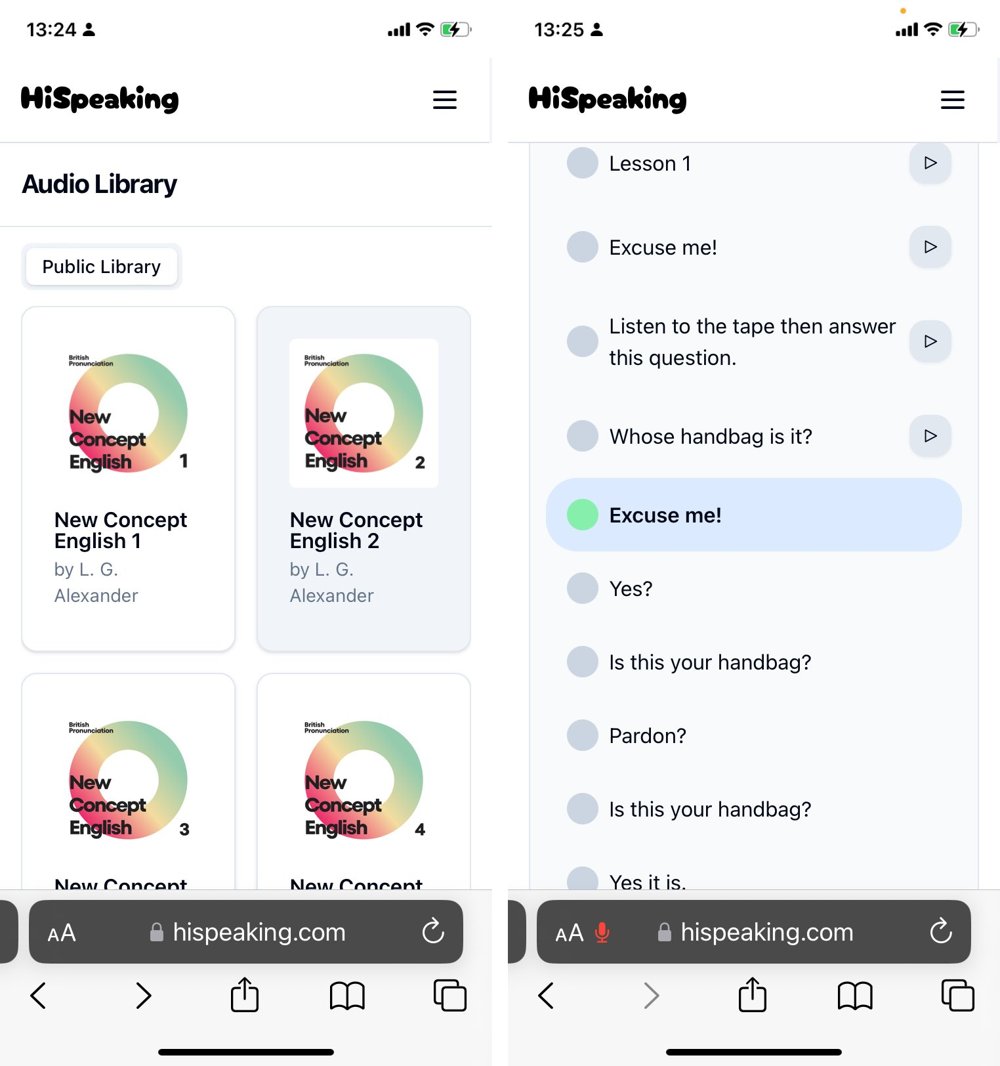
Every lesson in Hi Speaking is an audio file plus a caption file (SRT or LRC). The web app parses the captions into lines, and each line has a start time, an end time and its text. The player watches the playback time and pauses when it passes the end of the current line. The page shows the whole lesson as a list of sentences, and you can click any of them to jump there.
player.tsx. The lesson text is a sample.
Decision 2: no hands during practice
The core loop has to run without the mouse, so I put voice activity detection (VAD) in the browser. VAD is a small model that tells you when someone starts and stops speaking. Hi Speaking uses Silero VAD v5, which the @ricky0123/vad-react library runs in the browser through onnxruntime-web.
The microphone stays open, but the app only reacts while the player is paused. When VAD reports that you stopped speaking, the app saves your recording for that line. In Auto mode it then plays the next sentence. In Manual mode it moves to the next sentence and waits for you. The Tab key plays and pauses, so you never need the mouse during practice.
Next to each sentence there is a dot that shows the microphone state. Grey means it is not your turn yet. Light green means the app is listening, and dark green with a pulse means it can hear you.
The hardest part: the model on phones
My biggest problem was getting the model to run on phones. The VAD did not work in mobile browsers.
At first I gave up on phones. On 18 November 2024, five days after the first commit, I added a “Device Unavailable” page that every phone and tablet saw instead of the app. It said: “We are working on making it available on all devices.”
The fix took two days of trial and error, on 3 and 4 December. The git log shows each step:
- I moved from the old Silero VAD model to Silero VAD v5, which needed a newer version of the VAD library. After that I removed the “Device Unavailable” page.
- The model runs on
onnxruntime-web, which uses WebAssembly. The newest version, 1.20.1, did not work. I went back to 1.8.0 and then forward to 1.14.0, which worked on phones, so I pinned that exact version. - At first I served the model file, the audio worklet and the WASM files from the jsDelivr CDN. About ninety minutes later I copied them into the site’s build, so hispeaking.com serves them itself.
- I tuned the model for a phone microphone.
redemptionFrameswent from 40 to 36, which shortens how long the model waits before it decides you stopped. I also setminSpeechFrames: 4, so a short noise does not count as a take.
The last fix was merged at 13:21 on 4 December. Ten minutes later I posted that Hi Speaking now worked in mobile browsers.
Decision 3: you have to hear yourself
It is hard to fix a sound you have never heard yourself make. Each sentence keeps your last take, with a small play button next to it. The app can also join all your takes into one WAV file, so you can listen to the whole lesson in one go or download it.
Your recordings stay in the browser as local object URLs. The server never receives your voice.
Decision 4: content people want to shadow
The public library has nine collections: New Concept English books 1 to 4, each in a British and an American recording, and BBC Learning English’s 6 Minute English.
You can also bring your own material. The Audio Upload page takes an MP3 file and an SRT file and stores them in the browser’s IndexedDB. The page says so directly: “The audio will upload to your local browser storage and will not be saved on the server.”
Architecture
The web app uses Vite, React, TypeScript, shadcn/ui and Zustand. WaveSurfer.js draws the waveform and plays the audio. The site runs on Cloudflare Pages, with Plausible for analytics.
The server is written in Go with the Gin framework. It has users and JWT login, but the shadowing pages only need two public endpoints: one lists the collections, and one returns a collection with its lessons. Postgres stores users, collections and lessons. The audio and caption files are in Cloudflare R2, served from r2.hispeaking.com.
I split the work by the size of the data. Audio files are large and never change, so they sit in object storage behind a CDN, and the API never streams them. The API only serves small JSON with the metadata. Everything that has to happen in real time runs in the browser: VAD, recording and WAV encoding. That keeps the server cheap, and the user’s voice never leaves their machine.
Lessons are prepared offline. OpenAI’s Whisper turns an MP3 file into an SRT file. A Go helper uploads the audio and the captions to R2, under audio/<collection>/<lesson>.mp3 and .srt, and inserts a row for the lesson into Postgres. The row stores the path of the caption file, so the browser can fetch the audio and the captions straight from R2.
What it achieved
From the code and the commit history:
- The site went live six days after the first commit. The first commit was on 13 November 2024 and the launch post on 19 November. Work went on until 28 December, with 69 commits and 9 merged pull requests in total.
- The public library has nine collections: New Concept English 1 to 4 in British and American recordings, and 6 Minute English.
- You can upload your own MP3 and SRT files, and the lesson stays in your browser without touching the server.
On Twitter
I launched Hi Speaking with one post on Twitter (X) on the night of 19 November 2024. I wrote that I had built an immersive shadowing app, where AI voice detection hears when you finish a sentence and the next one plays by itself. I had spent the previous 20 hours polishing details and fixing bugs before the site went live.
It is the most viewed post I have written. X shows 155.1K views, 899 likes, 894 bookmarks, 188 reposts and 58 replies.
All my posts about Hi Speaking, with their views on X:
| date | post | views |
|---|---|---|
| 19 Nov 2024 | The launch post | 155.1K |
| 19 Nov 2024 | A reply with the link to the site | 3.8K |
| 4 Dec 2024 | Hi Speaking now works on phones and tablets, with the screenshots above | 1,846 |
| 6 Dec 2024 | Thanks to @ruanyf for the weekly | 502 |
| 25 Dec 2024 | My method: find words on YouGlish, collect videos, shadow them in Hi Speaking | 5.1K |
Recommended by Ruan Yifeng’s weekly
On 6 December 2024, Ruan Yifeng’s Tech Enthusiast Weekly, issue 328 (《科技爱好者周刊》第 328 期) listed Hi Speaking under Resources. It is one of the most read tech newsletters in Chinese. His one-line description is the experience I was going for: 一个英语跟读网站,你按照课本读一句,它会自动播放下一句,省去了手动点击。 In English: you read one sentence, it plays the next one by itself, and you skip the clicking.

What I learned
Shadowing was already a known method, so the new part of Hi Speaking was the experience: a loop you never have to touch. VAD is a small model, and it mattered more than anything else in the product, because it turned “pause, speak, drag, play” into just speaking. I used new technology because it let me build an experience that a plain audio player could not.
I also learned that the device the model runs on decides who can use the product. The model worked on a laptop from the first week. It took two more weeks, and a pinned runtime version, before it worked on a phone.